Track usage in the Notion credits dashboard
Learn how to use the Notion credits dashboard to track usage, plan future credit needs, and manage ongoing spend 📈
Gå till vanliga frågorThe Notion credits dashboard gives a clear view of how Custom Agents, Autofill, and Workers use Notion credits across the workspace. Use it to track usage, plan future credit needs, and manage ongoing spend. To access it, go to Settings → Access & billing → Notion credits.
Admins on Business and Enterprise plans can monitor usage in the dashboard. Custom Agent creators and Worker creators can also see workspace-level credit pacing. The table will show only the Custom Agents or Workers they've created.
In the dashboard, you can monitor:
Credit usage in real time.
Estimated usage through your monthly service date.
Agent-level runs and credit usage, so you can identify the agents driving spend and adjust them as needed.
If you manage multiple workspaces, you’ll also have a Notion credits dashboard in your admin console where you can track credit pacing and usage across your organization.
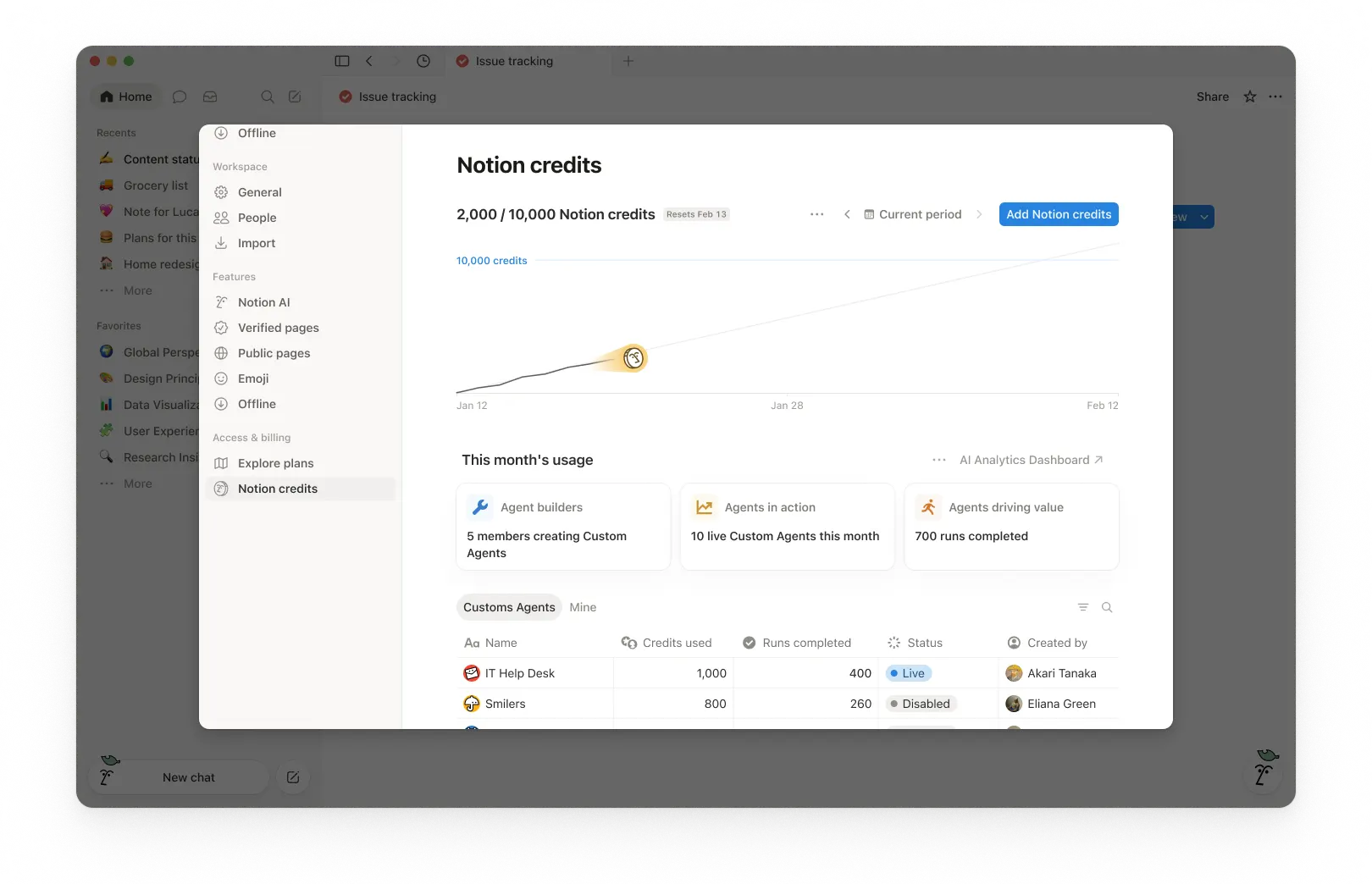
1. Usage summary
At the top of the dashboard, you’ll see the total Notion credits used for the selected period and your credits reset date. The selected period is based on your workspace’s billing cycle.
This gives you a quick snapshot of usage so far and when your monthly billing cycle ends.
2. Time period controls
In the top-right corner, use the period selector (for example, Current period) and navigation arrows to review past periods.
3. Usage chart
The usage chart shows credit usage over time:
Current shows your actual credits used so far.
Estimated projects where your usage is likely to land by the reset date if current patterns continue. The estimate is provided for informational purposes only and actual future usage may differ.
Use this to spot whether you’re pacing toward running out of credits before the reset.
4. Workspace usage cards
Under This month’s usage, you’ll see adoption and activity metrics such as:
Agent builders: How many members are creating Custom Agents.
Agents in action: How many live Custom Agents are running during the period.
Runs completed: How many tasks agents have completed across your workspace.
5. Usage breakdown
The usage table is organized into tabs so you can filter by type.
All: Every Custom Agent, Autofill, and Worker in your workspace.
Custom Agents: Custom Agent spend only.
Autofill: Autofill spend only.
Workers: Worker spend only. Workers show a Free badge during the beta period.
Mine: Only the Custom Agents and Workers you created
For each item, the table shows:
Notion credits used
Runs completed
Status
Created by
Include Worker spend in the main chart
By default, Worker spend is tracked separately from Custom Agent spend and isn't included in the main usage chart or total credit number. To fold Worker spend into the chart and total, select the three-dot menu ••• at the top of the dashboard and toggle on Include Worker spend.
What actions can an admin take to manage credit pacing?
Admins can monitor credit usage and control how Custom Agents run so spend stays predictable.
Admins have several ways to manage credit pacing:
Visibility: Track usage and trends in the Notion credits dashboard.
Guardrails: Decide who can create agents (and set limits).
Control: Pause or switch off agents anytime to stop usage while you investigate or make changes.
Optimize: Fine-tune agents to reduce extra steps and improve efficiency.
1. Monitor usage to know what’s driving spend
Use the Notion credits dashboard to track usage over time and see which features are using the most credits. Notion also notifies admins when the workspace is approaching or has reached the credit limit, so admins have time to act.
2. Set guardrails to prevent surprises
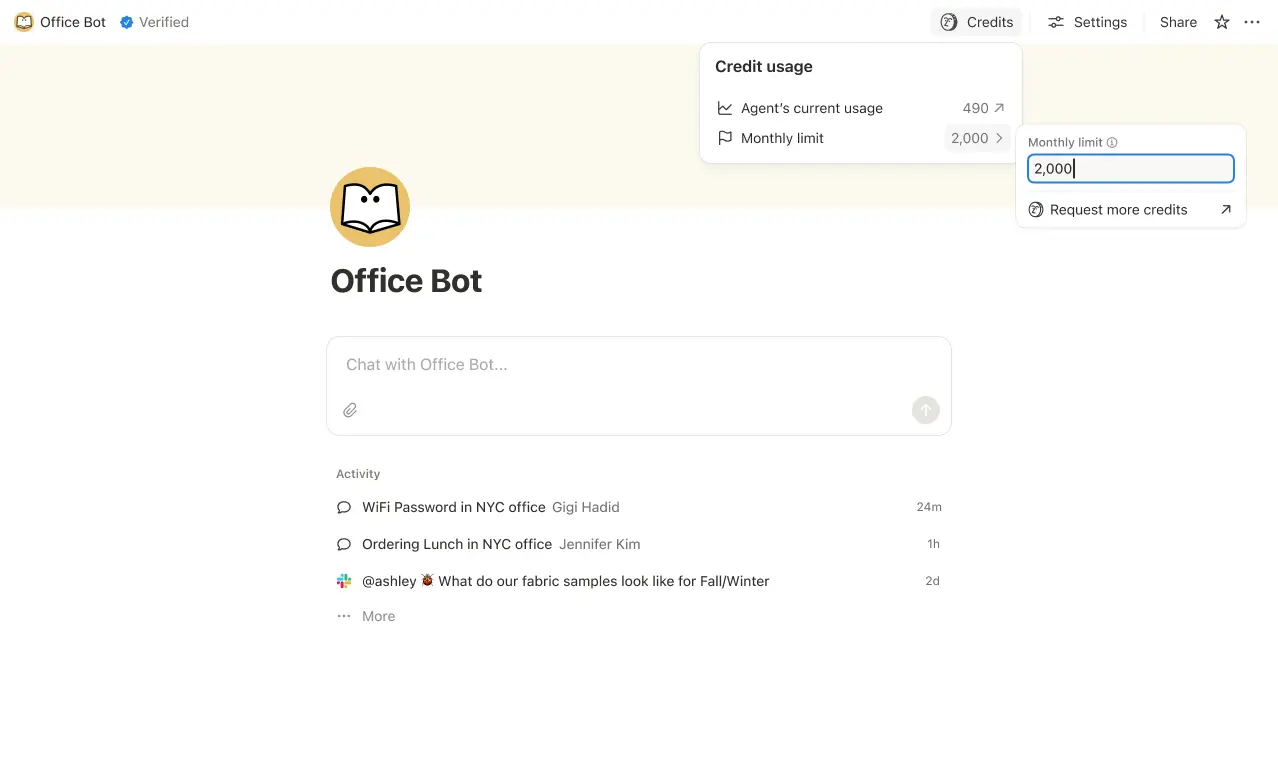
Set credit limits for individual Custom Agents so they pause when they hit a threshold. In some cases, an agent may go over the limit in order to complete an ongoing task. If a task is already running when it hits the cap, we let it finish before stopping new usage.
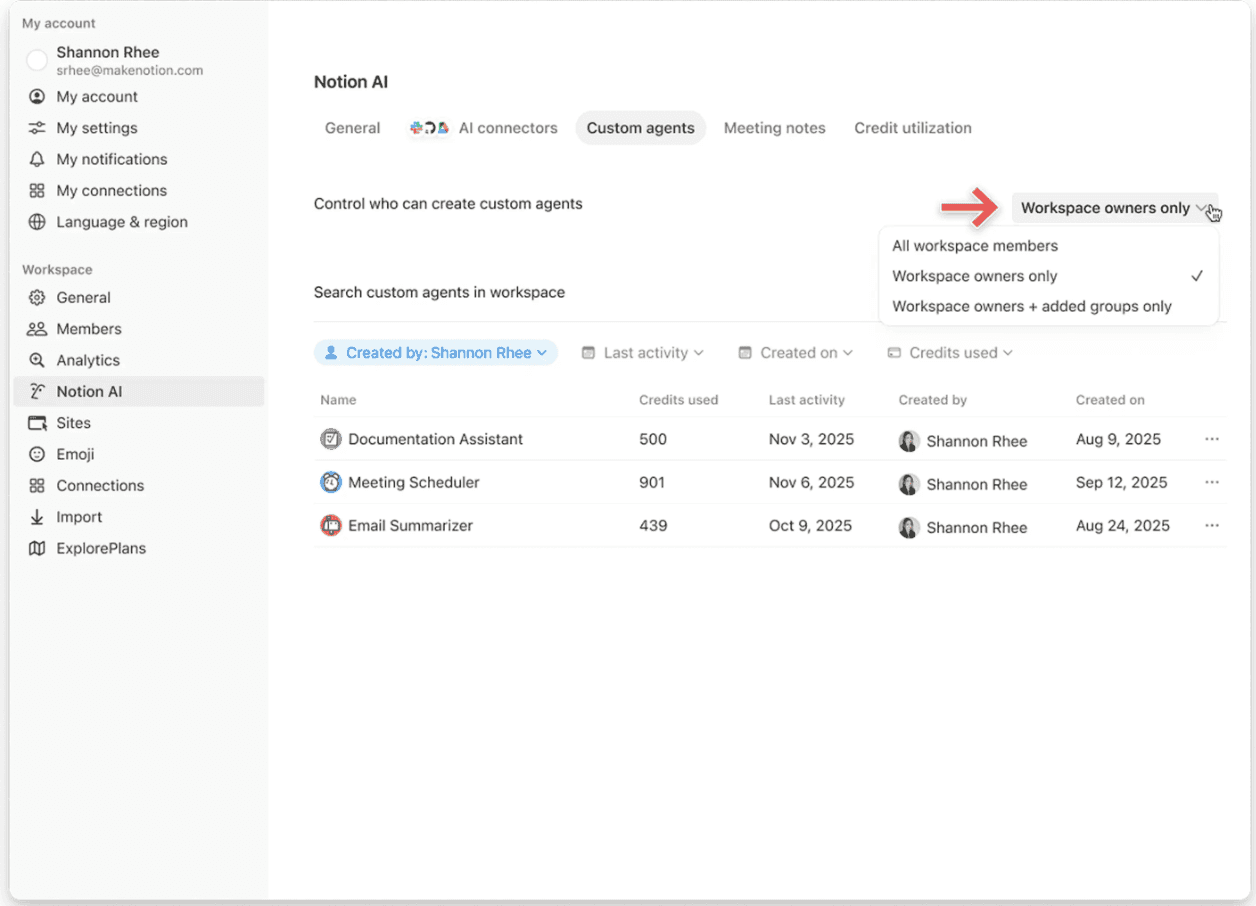
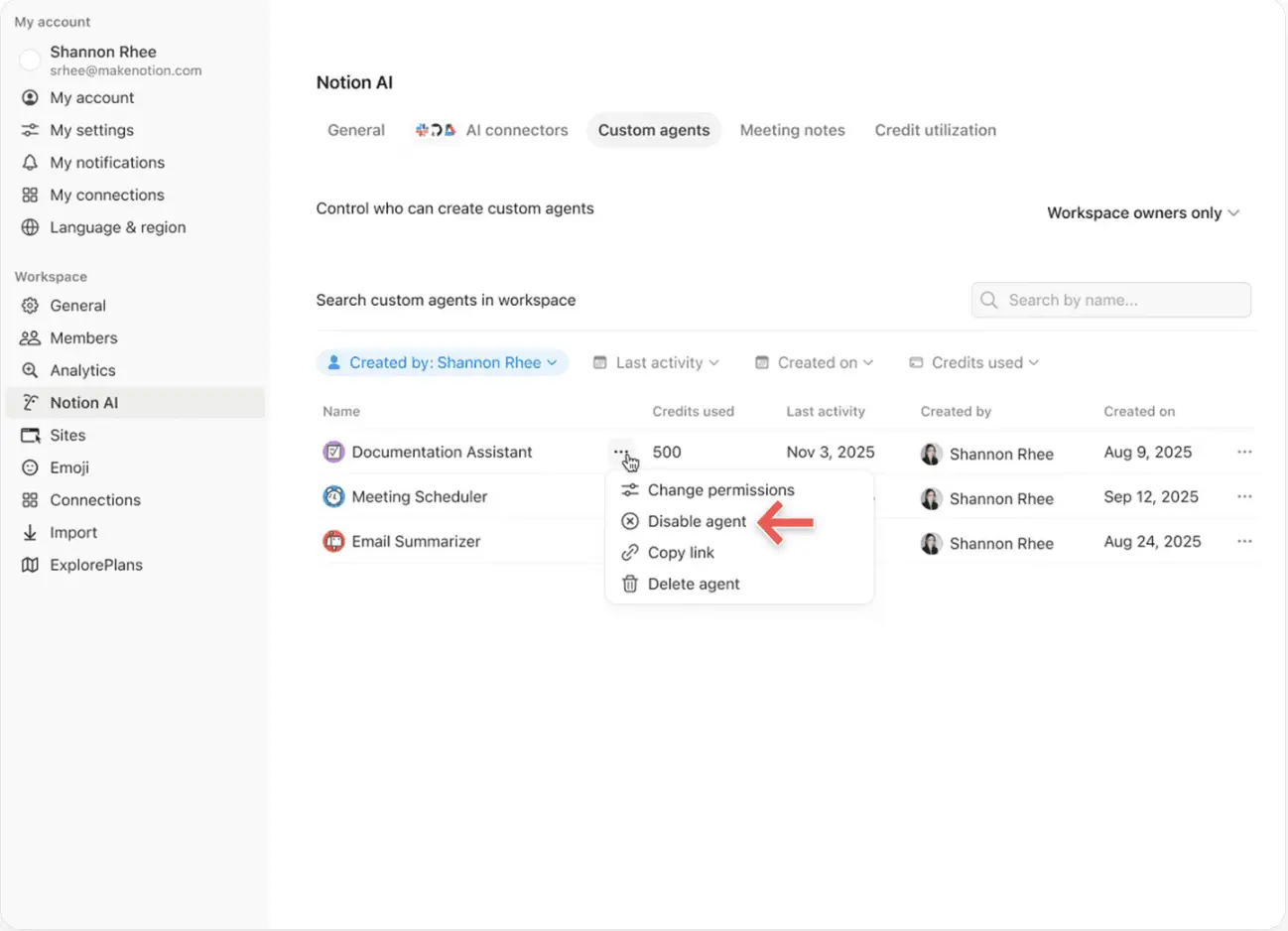
Control who can create Custom Agents (everyone, workspace owners only, or selected members).
3. Intervene quickly to stop usage
Pause or switch off a Custom Agent anytime to immediately stop credit usage while you review activity or adjust the agent.
4. Use Insights to optimize performance
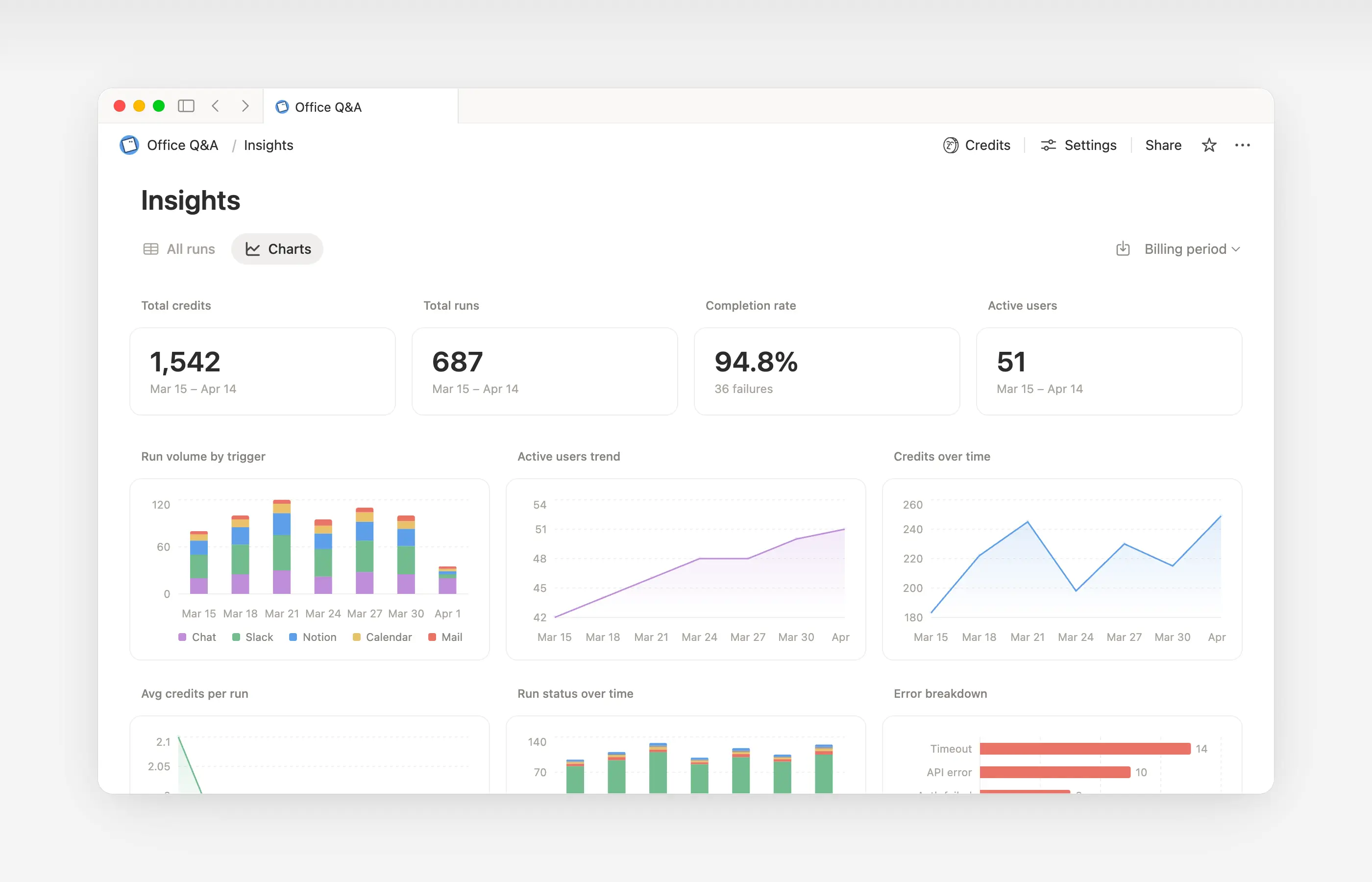
Insights helps Custom Agent creators and workspace admins understand activity so they can make targeted updates that improve performance. Use Insights to spot runs that take extra steps, fail and retry, or use a more expensive model than the job requires. Then, update the agent’s instructions or settings so it runs more efficiently.
Open Insights directly within an agent to:
Monitor your Custom Agent’s activity and credit usage.
Identify runs that are more expensive than expected.
Review what models, tools, and triggers were used.
Find and fix failed runs so your agent works more reliably.
Learn more about how to use Insights to reduce costs and improve a Custom Agent →

Learn what Custom Agents are and how they work.
Learn how Custom Agents access information, how sharing works, and what admins can control: Custom Agents sharing and permissions →
See more best practices on optimizing Notion credits and efficiency for Custom Agents in an admin’s guide to getting started with Custom Agents →
Vanliga frågor
Vad händer om vi får slut på Notion-krediter?
Vad händer om vi får slut på Notion-krediter?
Om din arbetsyta inte har tillräckligt med Notion-krediter pausas skräddarsydda agenter automatiskt tills krediterna återställs eller en administratör lägger till fler krediter.
Hur får administratörer meddelanden innan Notion-krediterna tar slut?
Hur får administratörer meddelanden innan Notion-krediterna tar slut?
Administratörer får meddelanden i appen (och via e-post) när din arbetsyta når 80 % och 100 % av sin användning av Notion-krediter, så att du har tid att justera innan skräddarsydda agenter pausas.
Hur köper jag fler Notion-krediter?
Hur köper jag fler Notion-krediter?
Administratörer kan köpa Notion-krediter antingen i produkten eller via sitt kundteam. Läs mer om hur du köper Notion-krediter.
Hur fungerar ändringar av Notion-krediter mitt i månaden?
Hur fungerar ändringar av Notion-krediter mitt i månaden?
Om du ökar dina krediter mitt i din månatliga tjänsteperiod är de ytterligare krediterna tillgängliga omedelbart för den aktuella tjänsteperioden. Du debiteras för det högre återkommande kreditbeloppet i början av ditt nästa månatliga tjänstedatum.
Om du minskar dina krediter mitt i din månatliga tjänsteperiod börjar det lägre beloppet gälla i början av nästa tjänsteperiod. Från och med då debiteras du för det lägre återkommande kreditbeloppet varje månad.
Jag arbetar med ett Kundteam för att köpa Notion-krediter. Vad händer om jag uppgraderar, utökar eller förnyar mitt Business- eller Enterprise-abonnemang, som inkluderar årliga Notion-krediter, mitt i mitt faktureringsintervall?
Jag arbetar med ett Kundteam för att köpa Notion-krediter. Vad händer om jag uppgraderar, utökar eller förnyar mitt Business- eller Enterprise-abonnemang, som inkluderar årliga Notion-krediter, mitt i mitt faktureringsintervall?
Du får en proportionell kredit för de oanvända förbetalda årliga Notion-krediterna motsvarande det lägsta av:
Dollarbeloppet för årliga Notion-krediter som förblir oanvända, eller
Avgifterna för årliga Notion-krediter justeras proportionellt för den tid som återstår i abonnemangsperioden.
Denna kredit tillämpas när ett nytt orderformulär för Business eller Enterprise ersätter ditt nuvarande innan abonnemangsperioden löpt ut. Notion-krediter har inget kontantvärde. Eventuell kredit tillämpas på det nya abonnemanget.
Använder Autofyll Notion-krediter?
Använder Autofyll Notion-krediter?
Autofyll har två alternativ: Grundläggande och Skräddarsydd agent.
Grundläggande Autofyll ingår i Business- och Enterprise-abonnemang och använder inte Notion-krediter.
Skräddarsydd agent Autofyll använder Notion-krediter eftersom den körs med funktioner för skräddarsydd agent (som att använda rikare kontext och mer avancerad resonemangsförmåga).
Vad händer med skräddarsydda agenter om jag nedgraderar mitt abonnemang?
Vad händer med skräddarsydda agenter om jag nedgraderar mitt abonnemang?
Om du nedgraderar ditt Notion-abonnemang till Kostnadsfritt eller Plus stängs alla befintliga skräddarsydda agenter av, men de raderas inte. Du kan visa (men inte redigera) chattsidan och inställningarna för den skräddarsydda agenten. Skräddarsydda agenter kan fortsätta om du uppgraderar tillbaka till Business eller Enterprise.
Kan jag köpa Notion-krediter om jag hanterar mitt Notion-abonnemang via App Store eller Google Play?
Kan jag köpa Notion-krediter om jag hanterar mitt Notion-abonnemang via App Store eller Google Play?
Inte direkt. Om ditt Notion-abonnemang hanteras via en mobilappbutik (Apple App Store eller Google Play) kommer du inte att kunna köpa Notion-krediter inifrån Notion.
För att köpa krediter behöver du:
Avsluta ditt abonnemang i den mobila appbutiken.
Uppgradera till ett Notion-abonnemang direkt på notion.com (Business eller Enterprise, med AI inkluderat).
När din nya prenumeration är aktiv kan en administratör köpa Notion-krediter från
Inställningar→Åtkomst och fakturering→Notion-krediter.
Se till att ditt nya abonnemang inkluderar AI innan du köper krediter. Notion-krediter är endast tillgängliga för Business- och Enterprise-abonnemang.